
Phishing, a prevalent cyber threat, often utilizes email as its primary vector, with PDF attachments frequently employed to deliver malicious payloads.
These deceptive emails mimic legitimate communications, aiming to steal sensitive information from unsuspecting individuals and organizations, as highlighted in recent awareness training.
Examples include fraudulent PDF invoices, fake banking statements, and scams related to events like the FIFA World Cup, demonstrating increasing sophistication.
What is Phishing?
Phishing is a type of online fraud where attackers masquerade as trustworthy entities – often via email – to trick individuals into revealing sensitive data. This data can include usernames, passwords, credit card details, and personally identifiable information. A common tactic involves distributing malicious PDF attachments designed to look harmless, but which contain malware or links to fraudulent websites.
These PDF-based phishing attempts exploit the widespread use and perceived safety of the PDF format. Attackers leverage social engineering, crafting emails that appear legitimate, often impersonating banks, online retailers, or well-known services like Netflix. The goal is to create a sense of urgency or fear, prompting recipients to open the PDF without careful consideration.
Recent reports indicate a surge in sophisticated phishing attacks, making identification increasingly difficult. The black market demand for information fuels this trend, with attackers constantly refining their techniques to bypass security measures and exploit human vulnerabilities. Awareness training, like that offered by SCCE, is crucial in equipping individuals to recognize and avoid these threats.
Why Phishing Emails are Effective
Phishing emails succeed due to a potent combination of psychological manipulation and technical deception. Attackers exploit human trust, often mimicking legitimate organizations and utilizing familiar branding to lull recipients into a false sense of security. The inclusion of seemingly innocuous PDF attachments further enhances their effectiveness, as PDFs are widely accepted and often perceived as safe document formats.
The effectiveness is amplified by the increasing sophistication of these attacks. Modern phishing campaigns are highly targeted, leveraging stolen data to personalize emails and increase their credibility. Malicious PDFs can contain embedded malware, or redirect users to fake websites designed to steal credentials. The sense of urgency or threat often employed compels quick action, bypassing critical thinking.
Furthermore, the sheer volume of phishing emails sent overwhelms defenses. As the demand for stolen information rises, attackers continually refine their techniques, making detection increasingly challenging. This underscores the importance of cybersecurity awareness training and robust email security practices.
The Rising Threat of Phishing in 2026
As we move into 2026, the threat of phishing continues to escalate, becoming the primary cyber risk for organizations. The black market’s insatiable demand for personal and financial data fuels this growth, driving attackers to develop increasingly sophisticated techniques. PDF-based phishing attacks are projected to become even more prevalent, leveraging advanced features to evade detection and exploit vulnerabilities.
The sophistication lies in the ability to craft highly targeted campaigns, often utilizing information gleaned from data breaches and social engineering. Malicious PDFs will likely incorporate more complex malware, including ransomware and keyloggers, disguised within seemingly legitimate documents. Expect to see a rise in polymorphic malware within PDF attachments, changing its code to avoid signature-based detection.
The increasing reliance on remote work and cloud-based services further expands the attack surface, making individuals and organizations more vulnerable. Proactive cybersecurity awareness training and robust anti-phishing tools are crucial to mitigate this growing threat.
Common Characteristics of Phishing Emails
Phishing emails, including those with malicious PDF attachments, exhibit traits like suspicious sender addresses, generic greetings, and urgent requests for information or action.
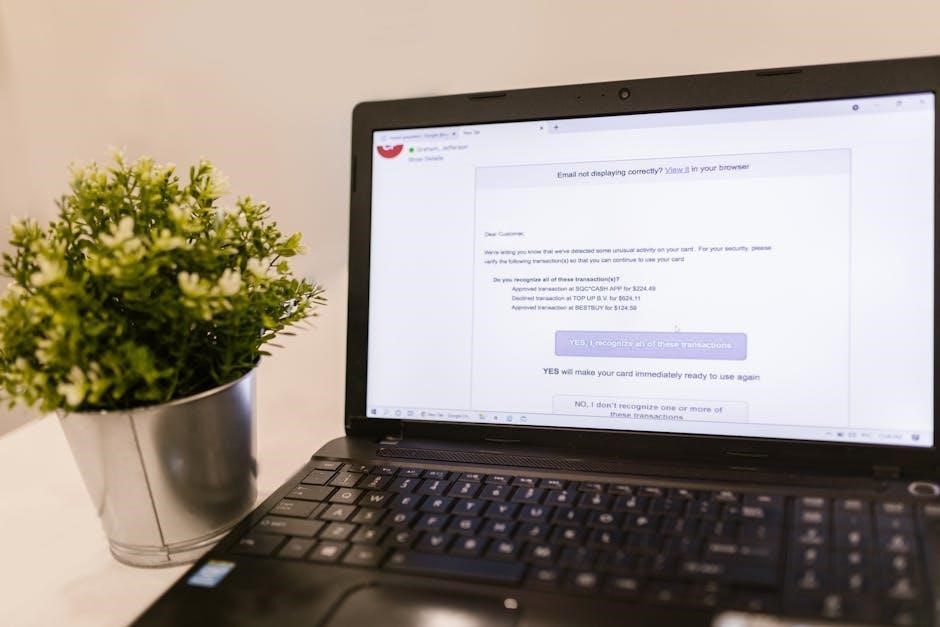
Poor grammar and spelling are also red flags.
Suspicious Sender Addresses
Phishing emails frequently employ sender address spoofing, a technique where the “From” address is forged to appear legitimate. This deception is a cornerstone of many PDF-based phishing attacks, aiming to trick recipients into believing the email originates from a trusted source, such as their bank or a well-known company.
However, closer inspection often reveals discrepancies. For instance, an email seemingly from a legitimate domain might contain slight variations in the address – a misspelled domain name, added characters, or a different top-level domain (e.g., .net instead of .com). Attackers meticulously craft these addresses to bypass initial scrutiny.
The provided examples demonstrate how a seemingly valid email address (e.g., email160;protected) can be a cleverly disguised spoof, actually originating from a malicious source (email160;protected). Always verify the sender’s address carefully, and avoid clicking links or opening attachments from unfamiliar or questionable sources, especially PDF files.
Hovering over the sender’s name can reveal the actual email address, aiding in identification.
Generic Greetings
A hallmark of many phishing emails, including those delivering malicious PDF attachments, is the use of generic greetings. Instead of addressing you by name, these emails often begin with impersonal phrases like “Dear Customer,” “Dear User,” or simply “To Whom It May Concern.” This lack of personalization is a significant red flag, as legitimate organizations typically personalize their communications.
Attackers employing mass-phishing campaigns rely on these generic greetings because they don’t have – and don’t intend to obtain – specific information about each recipient. This approach allows them to send out a large volume of emails with minimal effort. The goal is to cast a wide net and hope that a percentage of recipients will fall for the scam.
Be particularly wary of emails requesting sensitive information after a generic greeting, especially if they contain PDF attachments. Legitimate businesses will almost always address you by name in important communications. Always scrutinize the greeting and overall context before engaging with the email or opening any attachments.
Sense of Urgency
Phishing emails, frequently utilizing deceptive PDF attachments, commonly employ a tactic designed to bypass careful consideration: creating a false sense of urgency. These emails often claim immediate action is required, warning of dire consequences if you don’t respond promptly. Examples include threats of account suspension, immediate financial loss, or missed opportunities.
This tactic aims to pressure recipients into acting without thinking critically. Attackers understand that when people feel rushed, they are less likely to scrutinize the email for red flags or verify the sender’s authenticity. The urgency is often fabricated, designed solely to manipulate your behavior.
Be extremely cautious of emails demanding immediate action, particularly those containing PDF attachments. Legitimate organizations rarely require urgent responses for routine matters. Take a moment to independently verify the request through official channels before clicking any links or opening attachments. A genuine sense of security is more valuable than a perceived time saving.
Threats and Intimidation
Many phishing emails, particularly those distributing malicious PDF attachments, escalate beyond simple requests and employ threats and intimidation to coerce recipients into compliance. These emails might falsely claim legal action will be taken, accounts will be frozen, or negative credit reporting will occur if demands aren’t met immediately.
The intent is to instill fear and panic, overriding rational thought and prompting hasty action. Attackers leverage the anxiety associated with potential financial or legal repercussions. Examples include fabricated notices from law enforcement or threatening messages regarding unpaid bills, often delivered via a seemingly official PDF document.
Remember, legitimate organizations rarely resort to threats in initial communications. If an email attempts to frighten you into action, it’s a strong indicator of a phishing attempt. Do not engage with the sender; instead, report the email and independently verify any claims through official channels. Prioritize caution over fear.
Poor Grammar and Spelling
While increasingly sophisticated phishing attempts strive for professionalism, a common hallmark – especially in PDF-delivered scams – remains consistently poor grammar and spelling. Attackers, often operating outside of native English-speaking regions, frequently produce emails riddled with errors that a legitimate organization would never overlook.
These errors aren’t merely typos; they often involve incorrect verb tenses, awkward phrasing, and misused punctuation; The PDF attachment itself might contain similar linguistic flaws, further raising suspicion. Be particularly wary of emails containing urgent requests or financial demands presented with noticeable grammatical inconsistencies.
However, it’s crucial to note that this isn’t a foolproof indicator. Some phishers are improving their language skills. Therefore, poor grammar should be considered one red flag among many, not a definitive sign. Always cross-reference with official sources and exercise caution when encountering poorly written communications, especially those containing PDFs.
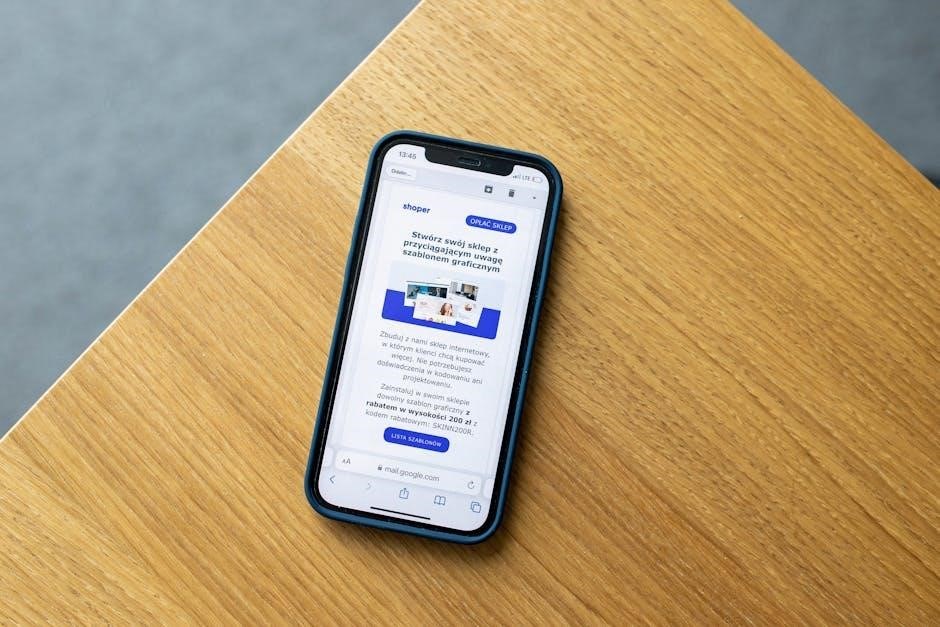
Specific Phishing Email Examples (PDF Focus)
PDF-based phishing attacks commonly impersonate banks, deliver fake invoices, mimic online shopping receipts, exploit event themes like the FIFA World Cup, and utilize Netflix billing scams.
Phishing Emails Impersonating Banks (PDF Attachments)
Phishing campaigns frequently target banking customers, employing sophisticated tactics to appear legitimate. These emails often feature the bank’s logo and branding, meticulously copied to deceive recipients. A common method involves attaching a malicious PDF document disguised as a statement, notification, or security alert.
The PDF itself may contain a link leading to a fake login page designed to steal credentials, or it could directly download malware onto the user’s device upon opening. Attackers leverage sender address spoofing, making the email appear to originate from the bank’s official domain, though closer inspection reveals discrepancies.
These emails often create a sense of urgency, claiming account suspension or fraudulent activity requiring immediate action. Recipients are pressured to open the PDF and follow the instructions without careful consideration. Cybersecurity awareness training emphasizes scrutinizing sender addresses, avoiding clicking links within suspicious PDFs, and contacting the bank directly through official channels for verification.
Fake Invoice Emails with Malicious PDFs
A prevalent phishing tactic involves distributing fake invoice emails containing malicious PDF attachments. These emails typically appear to originate from legitimate businesses or service providers, aiming to trick recipients into opening the attached document. The PDF is often presented as an invoice for goods or services, potentially referencing a past transaction to enhance credibility.
However, upon opening, the PDF may trigger the download of malware, compromise the user’s system, or redirect them to a phishing website designed to steal login credentials or financial information. Attackers often employ social engineering techniques, creating a sense of urgency or implying a payment is overdue.
These emails frequently lack proper grammar and spelling, a telltale sign of a phishing attempt. Cybersecurity awareness training stresses the importance of verifying invoices directly with the supposed sender through a known contact number or official website, rather than interacting with the PDF attachment. Always exercise caution when dealing with unexpected invoices.
Phishing Emails Related to Online Shopping (PDF Receipts)
Phishing campaigns frequently exploit the popularity of online shopping by sending fraudulent emails disguised as purchase receipts. These emails often feature logos and branding mimicking well-known retailers, creating a convincing illusion of legitimacy. The core of the scam lies in a PDF attachment presented as proof of purchase or an order confirmation.
However, opening this PDF can expose users to significant risk. The attachment may contain malicious code designed to install malware, steal login credentials for the shopping platform, or redirect victims to fake websites that harvest personal and financial data. Attackers capitalize on the expectation of receiving receipts after online transactions.
Cybersecurity awareness training emphasizes verifying purchases directly through the retailer’s website or app, rather than clicking on links or opening attachments in unsolicited emails. Be wary of unusually large discounts or offers, and always scrutinize the sender’s email address for inconsistencies. A legitimate retailer will rarely send a receipt as a PDF.
Phishing Emails Targeting Specific Events (FIFA World Cup Example)
Cybercriminals frequently leverage major global events, like the FIFA World Cup, to launch targeted phishing campaigns. These emails capitalize on heightened public interest and excitement, employing deceptive tactics to trick individuals into divulging sensitive information. A common tactic involves offering exclusive World Cup merchandise, tickets, or streaming access via malicious links or PDF attachments.
These PDFs often masquerade as official event schedules, promotional offers, or even e-tickets. However, upon opening, they can install malware, redirect users to fraudulent websites designed to steal credentials, or initiate ransomware attacks. The urgency created by limited-time offers or the fear of missing out further pressures victims into acting without caution.
Awareness training stresses the importance of verifying the authenticity of any World Cup-related communication directly through official FIFA channels. Avoid clicking on links or downloading attachments from unknown senders, and always scrutinize the sender’s email address for discrepancies. Remember, legitimate offers rarely require immediate action or personal information via email.
Netflix Billing Scam Emails (PDF Statements)
Netflix billing scam emails represent a pervasive phishing tactic, frequently employing malicious PDF statements to deceive users. These emails typically claim an issue with your account payment, prompting you to view a detailed invoice attached as a PDF. The urgency conveyed – potential service interruption – encourages hasty action without proper verification.
Upon opening, these PDFs rarely contain legitimate billing information. Instead, they often harbor malware designed to compromise your device, steal login credentials, or redirect you to a fake Netflix login page. This page meticulously mimics the genuine Netflix interface, capturing your username and password when entered.
Cybersecurity awareness training emphasizes that Netflix primarily communicates billing information through your account portal on their website or app, not via email attachments. Always access your billing details directly through the official Netflix platform. Never download or open PDF statements received unexpectedly via email, and be wary of any request for personal information.
Analyzing Phishing Email Techniques
Phishing attacks, including those using PDFs, rely on sender spoofing, legitimate branding imitation, and disguised malicious links to deceive recipients effectively.
Embedded malware within PDF attachments further complicates detection, requiring vigilant scrutiny of all email components.
Sender Address Spoofing
Sender address spoofing is a core technique in phishing attacks, particularly those leveraging PDF attachments. Attackers manipulate the “From” field in emails to display a seemingly legitimate sender, often mimicking trusted entities like banks or well-known companies.
However, a closer examination reveals the email originates from a different, malicious source. As noted in recent cybersecurity awareness training, this deception aims to bypass initial trust filters. For instance, an email might appear to come from a protected domain (e.g., @bankofamerica.com) but actually originates from a completely unrelated and spoofed address.
This is achieved by altering email headers, making it appear as though the message genuinely came from the impersonated sender. Victims, believing the email is authentic, are more likely to open malicious PDF attachments or click on embedded links. Detecting spoofing requires careful inspection of email headers – a task often beyond the average user, highlighting the need for robust email security tools and training.
The sophistication of these attacks is increasing, making it increasingly difficult to identify fraudulent emails based solely on the displayed sender address.
Use of Legitimate Branding
Phishing emails, especially those distributing malicious PDF attachments, frequently employ the deceptive tactic of utilizing legitimate branding. Attackers meticulously copy logos, color schemes, and overall visual styles from trusted organizations – banks, retailers, streaming services like Netflix – to create a convincing facade of authenticity.
This isn’t simply about visual similarity; phishers often incorporate accurate branding guidelines, making their fraudulent emails remarkably difficult to distinguish from genuine communications. The goal is to exploit pre-existing trust in these brands, lowering the victim’s guard and increasing the likelihood they’ll interact with the malicious content, such as opening a harmful PDF.
Recent reports emphasize the increasing sophistication of this technique. Attackers aren’t just copying logos; they’re replicating the tone and language used in official communications. This detailed mimicry extends to PDF attachments, which may feature perfectly replicated invoice templates or statements. Cybersecurity awareness training stresses the importance of verifying authenticity through independent channels, rather than relying solely on visual cues.
Malicious Links Disguised as Safe URLs
Phishing emails, often containing malicious PDF attachments or leading to compromised websites, heavily rely on disguising dangerous links as legitimate URLs. Attackers employ various techniques to mask their true intentions, exploiting human tendencies to quickly scan rather than meticulously examine web addresses.
Common tactics include using URL shortening services, employing subdomains that closely resemble trusted domains, and utilizing Unicode characters to visually mimic legitimate letters. For example, a link might appear to direct to a bank’s website but subtly redirect to a phishing page designed to steal credentials. Even within PDF documents, clickable links can be embedded, leading users to malicious sites.
Cybersecurity awareness training emphasizes hovering over links (without clicking) to reveal the actual URL. The presence of misspellings, unusual characters, or a domain name that doesn’t match the purported sender should raise immediate red flags. Recognizing these deceptive practices is crucial in preventing successful phishing attacks and protecting against the risks associated with malicious PDF downloads.
Embedded Malware in PDF Attachments
PDF attachments remain a favored delivery method for phishing attacks, frequently concealing embedded malware designed to compromise systems. While PDFs appear harmless, attackers exploit vulnerabilities within the PDF format or utilize JavaScript to execute malicious code upon opening. These payloads can range from ransomware that encrypts files to spyware that steals sensitive data.
Recent examples demonstrate sophisticated techniques, including the use of macro-enabled PDFs that require users to enable content, unknowingly activating the malware. Even seemingly legitimate invoices or statements can harbor hidden threats. Security software often struggles to detect these embedded threats, making user vigilance paramount.
Cybersecurity awareness training stresses caution when opening PDF attachments from unknown senders or those that seem unexpected. Disabling automatic content execution within PDF viewers and keeping software updated are crucial preventative measures. Analyzing the file’s properties and scanning with multiple antivirus solutions can also help identify potentially malicious PDFs before they inflict damage.

Protecting Yourself from Phishing Emails
Robust email security practices, recognizing phishing attempts, and utilizing anti-phishing tools are vital defenses against malicious PDF-laden emails.
Cybersecurity awareness training empowers users to identify and report suspicious communications effectively.
Email Security Best Practices
Implementing strong email security protocols is paramount in mitigating the risk posed by phishing emails, particularly those leveraging malicious PDF attachments. Regularly update your email filters and spam blockers to effectively identify and quarantine suspicious messages before they reach your inbox.
Enable multi-factor authentication (MFA) on all email accounts to add an extra layer of security, even if a phisher obtains your password. Exercise extreme caution when clicking links or opening attachments, especially from unknown senders or those requesting sensitive information. Always verify the sender’s address carefully, looking for subtle misspellings or inconsistencies.
Consider utilizing email sandboxing solutions, which isolate and analyze attachments – like PDFs – in a safe environment before they are delivered to your inbox. Regularly educate yourself and your employees about the latest phishing tactics and techniques, emphasizing the importance of vigilance. Promptly report any suspected phishing attempts to your IT security team or relevant authorities. A proactive approach to email security is crucial in safeguarding against increasingly sophisticated phishing attacks.
Recognizing and Reporting Phishing Attempts
Identifying phishing attempts, especially those disguised within seemingly harmless PDF attachments, requires a keen eye for detail. Be wary of emails with a sense of urgency, threatening language, or requests for personal information. Scrutinize sender addresses for inconsistencies – even slight variations can indicate a spoofed email.
Poor grammar and spelling are often red flags, as are generic greetings instead of personalized addresses. If an email asks you to open a PDF attachment unexpectedly, especially an invoice or statement, proceed with extreme caution. Hover over links without clicking to reveal the actual URL and verify its legitimacy.
Reporting suspected phishing emails is crucial. Most email providers offer a “Report Phishing” button. Forward the email as an attachment to your organization’s security team or relevant authorities (like the Anti-Phishing Working Group). Sharing these examples helps improve detection capabilities and protects others from falling victim to these scams. Prompt reporting is a vital component of collective cybersecurity.
The Role of Cybersecurity Awareness Training
Cybersecurity awareness training is paramount in combating the escalating threat of phishing, particularly those leveraging deceptive PDF attachments. Training empowers individuals to recognize the hallmarks of phishing emails – suspicious sender addresses, urgent requests, and grammatical errors – turning employees into a crucial first line of defense.
Effective training should include real-world examples of phishing attacks, specifically showcasing how malicious PDFs are used to distribute malware or steal credentials. Simulations, where employees are presented with realistic phishing scenarios, are invaluable for reinforcing learned concepts.
Training must emphasize the importance of verifying sender authenticity, scrutinizing links before clicking, and reporting suspicious emails promptly. Given the increasing sophistication of attacks, ongoing and updated training is essential. A well-informed workforce significantly reduces the risk of successful phishing campaigns and protects organizational assets, as highlighted by SCCE awareness programs.
Utilizing Anti-Phishing Tools and Software
Employing dedicated anti-phishing tools and software is crucial for bolstering defenses against increasingly sophisticated attacks, including those utilizing malicious PDF attachments. These tools often incorporate advanced threat intelligence, analyzing email content and attachments for suspicious patterns and known phishing indicators.

PDF-specific security solutions can scan attachments for embedded malware, malicious scripts, and attempts to exploit vulnerabilities. Email security gateways can filter out phishing emails before they reach users’ inboxes, while browser extensions can warn users about potentially dangerous websites linked within emails.
Furthermore, solutions offering sender authentication protocols (like SPF, DKIM, and DMARC) help verify the legitimacy of email sources, reducing the success rate of sender address spoofing. Regularly updating these tools and integrating them with threat intelligence feeds ensures ongoing protection against evolving phishing tactics, particularly those involving deceptive PDF documents.